Client Work (and Play)
We seek out projects that shake expectations and nudge the world forward. If you’re exploring innovative interactions, fundamental social change, or industry reinvention, we’d love to work with you. Here’s a taste of what we do.






dotdash
Design To Wake a Sleeping Giant
Big Medium helped About.com (now Dotdash) reinvent its product strategy and design process—and created some mighty good-looking and profitable sites along the way.
exxonmobil
Scaling Great Design Across a Fortune 10 Company
Big Medium crafted a design system to help one of the world’s biggest companies scale great design across hundreds of apps.
samsung
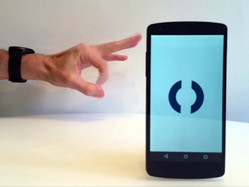
Natural Gesture Language for Smartwatches
Big Medium worked with Samsung to prototype a natural-gesture language for smartwatches: snap your hand or flick your finger to control your digital life.

propeller health
UX for a Connected Inhaler
Big Medium designed the UX flow, data visualization, and visual interface for the web and mobile apps of Propeller Health’s bluetooth-connected asthma inhaler.

from the lab
Shake Music from your Phone to your PC
Happy Together is a prototype app that lets you transfer data or media by shaking it out of your phone.

Time Inc.
An Online Home for the World's Biggest Publisher
We crafted a new website—and along the way, a new brand—for the world’s most iconic publisher. Here’s how we did it.

ew.com
Mobile Magic for Entertainment Weekly
Entertainment Weekly has a new responsive mobile website. Here’s a behind-the-scenes look at how we built it.

responsive
People Magazine: Time Inc.'s first responsive site
We designed the responsive mobile website for People Magazine. Here’s how we did it and why.