Blog

Or search support forum

What's Global Moxie?

Global Moxie is the hypertext laboratory of Josh Clark, a writer, programmer and designer whose projects include the Big Medium web content management system. Josh spins words and code from his multimedia studio in Paris, France.

What's Big Medium?

Big Medium is flexible, easy-to-use server software for creating and editing websites directly from your browser. Check out the features or download now.

On Shelves

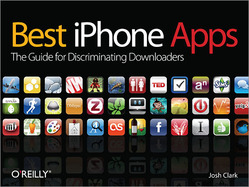
Cover: Best iPhone Apps

Best iPhone Apps is my guide to more than 200 gee-whiz apps to unlock the full potential of your favorite gadget. Order yours now.

iWork ’09: The Missing Manual

iWork ’09: The Missing Manual is my fun and comprehensive book about Apple’s remarkable word processor, presentation software, and spreadsheet program.
Order yours now.

Moxiemail

Enter your e-mail to receive occasional updates:

Best iPhone Apps: Picks, advice, and resources

Posted Sep 11, 2009

Cover: Best iPhone Apps

Since Best iPhone Apps hit bookshelves, several publications have asked me to share my top-ten lists for various categories of apps (thanks!). Here’s a selection of those writings from around the web, all tailored to help you unlock the full potential of your iPhone or iPod Touch...

  • Forbes: “Best iPhone Apps for Creativity”
    Pack your phone with an easel, darkroom, notebook, crooning robot and more, with my picks of the ten best apps for scratching the creative itch.

  • Forbes: “iPhone Apps for Road Warriors”
    The iPhone is a device of convenience and context. Unlike laptops, notebooks or messy collections of Post-It notes, your phone rarely leaves your side, making it a handy vessel for bottling brainstorms, managing to-dos and itineraries, or capturing on-the-go information like expenses or billable hours.

  • “Best iPhone app ever? Book has one answer”
    Columnist Gregg Ellman reviews the book and dishes my personal list of top-10 must-have apps. If you could only have ten, these are the apps to get. (Spoiler: Instapaper takes the top slot.)

What do you do with all those apps?

Once you’ve downloaded all those apps, how do you keep them organized? I examined the problem over at the O’Reilly Media blog:

Informal testing here in the O’Reilly laboratories indicates that flipping through the book tends to triggers bouts of deliriously eager downloading. Alas, freshly minted App Store addicts quickly discover that an ever-growing mountain of installed iPhone apps can create more headaches than they collectively solve. Productivity apps become ironic jokes when it takes a full minute of flipping back and forth through screens to locate them; and there’s no fun in a game that you can’t even find. A healthy collection of iPhone apps calls for an equally healthy hygiene regimen for your iPhone. Here are a few pointers for keeping your apps tidy and your data safe.

Among the tips:

  1. Safety First: Safeguard your privacy with a passcode.
  2. Collect Your Greatest Hits: Consolidate your most-used apps on the home screen.
  3. Get Organized: Divide remaining screens by category, task, or state of mind.
  4. Shine the Spotlight: When all else fails, Spotlight can help you find an app in your sea of downloads.
  5. Do you really need ‘em all? Prune unused apps.

Read more: “Embarrassment of Riches: Managing a Mountain of iPhone Apps”

For more iPhone info...

Check out the Best iPhone Apps website at iphoneapps.oreilly.com for a daily download recommendation, a weekly head-to-head app smackdown, and a growing collection of iPhone tips and tricks.

For a steady stream of iPhone chatter, follow @oreillyiphone on Twitter, where I’ve started steering my iPhone banter. (Those of you following me at @globalmoxie will be either relieved or chagrined to find it largely iPhone-free going forward; adjust your Twitter account accordingly.)

Tags: , , , , ,

Want more? Recent blog entries...

Comments

3 comment(s) on this page. Add your own comment below.

Steve Carter
Sep 16, 2009 1:07am [ 1 ]

hey...are you planning to offer a help forum for this project, similar to your big medium forum? I'm wondering because there are so many of us totally green people that could benefit from your advice. Like I just realized today for the first time that the ipod touch will give you almost everything that the iphone offers WITHOUT an AT&T cell phone contract. Wow, now thats a big deal to me....now I might actually get one, and i have a thousand questions, starting with "what exactly will I NOT get?"

Oct 2, 2009 5:12pm [ 2 ]

Thanks for the interest, Steve, and welcome to the iPhone fold (the iPhold?). I'm not planning on starting a help forum at this site, but you can find regularly updated info at my Best iPhone Apps website where you're welcome to post questions in the comments, etc.

But for your question here -- what do you lose by getting an iPod touch instead of an iPhone -- the gist is that the touch doesn't have a camera, microphone, or GPS. So any apps that rely on those features won't work with the touch. That still leaves a wide swath of stuff you can do with the iPhone, especially when you have a WiFi connection, but some of the most interesting features of networked/location-based apps won't be available to you.

Hope that helps!
Josh

Nov 5, 2009 11:50am [ 3 ]

Great list! I have been a long time user of FreshApps and I love it. Apptism has some cool stuff too, but really, just like you said in the review, FreshApps allows you to sort by newest free apps, and that is what I do all the time.

Add a Comment

Don't be shy.

(Use Markdown for formatting.)

This question helps prevent spam:

Download Big Medium
Try it free for 30 days, or buy to unlock.

State of Josh's Brain

Hanging

Providence, RI

Map of Josh's current location

Snapping

Latest photos